Introduction
VPN technology, or Virtual Private Network technology, has become an important tool for online privacy, cybersecurity, and secure internet access. As people increasingly use public Wi-Fi, cloud services, online banking, remote work platforms, and digital communication, protecting internet traffic has become more important.
A VPN creates an encrypted connection between a device and a VPN server. Instead of sending internet traffic directly through the user’s normal internet connection, the VPN routes traffic through its secure connection before it reaches the wider internet.
VPN technology can help protect data from certain types of network interception, particularly when using untrusted networks. It can also hide a user’s IP address from websites by making the VPN server’s IP address visible instead.
However, a VPN is not a complete cybersecurity solution. It does not automatically protect users from phishing, malware, weak passwords, unsafe websites, or every form of online tracking.
This VPN technology guide explains how virtual private networks work, different VPN types, encryption, protocols, benefits, limitations, security considerations, and future trends.
What Is VPN Technology?
A Virtual Private Network (VPN) is a technology that creates a protected network connection over an existing internet connection.
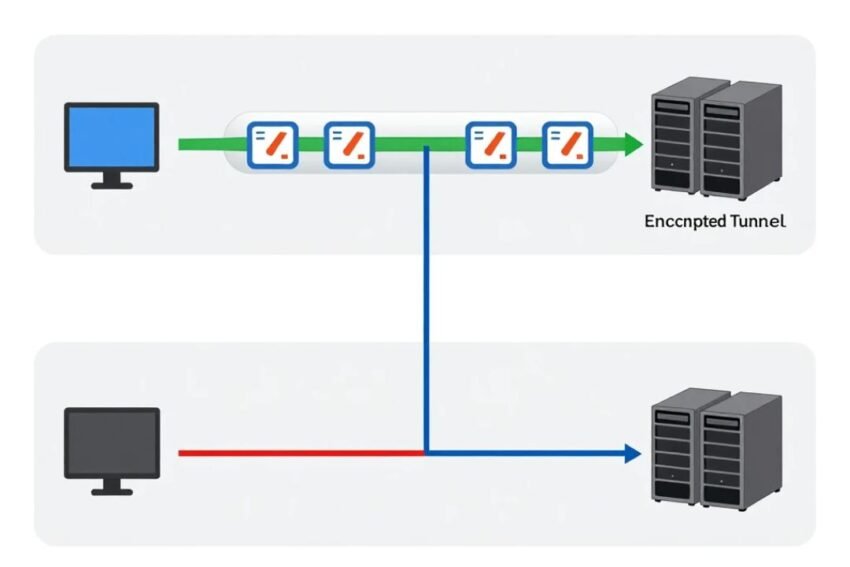
A VPN generally works by establishing an encrypted tunnel between a device and a VPN server.
The basic process is:
- Your device connects to the VPN service.
- The VPN client establishes a secure connection.
- Internet traffic is encrypted between the device and VPN server.
- The VPN server forwards traffic to the destination.
- Responses return through the VPN connection.
This can make network traffic more difficult for someone on the same local network to inspect.
How Does a VPN Work?
VPN technology combines several networking and security techniques.
VPN Client
The VPN client is the application or software installed on your device.
It can be available for:
- Windows
- macOS
- Linux
- Android
- iOS
- Routers
- Other supported platforms
The client manages the VPN connection and applies the configured security settings.
VPN Server
A VPN server receives encrypted traffic from the client and forwards it toward its destination.
Websites and online services generally see the VPN server’s public IP address rather than the user’s original public IP address.
Encrypted Tunnel
The connection between the VPN client and VPN server is protected using encryption and authentication mechanisms.
This creates what is commonly described as an encrypted tunnel.
The exact protection depends on the VPN protocol, encryption algorithms, configuration, and provider implementation.
What Is VPN Encryption?
Encryption converts readable information into a protected form that cannot easily be understood without the appropriate cryptographic keys.
VPN encryption can help protect traffic traveling between a user’s device and the VPN server.
For example, if someone is connected to an untrusted Wi-Fi network, a properly configured VPN can reduce the ability of other network users to inspect the protected traffic between the device and VPN server.
Modern VPN systems can use strong cryptographic algorithms and secure authentication methods.
However, encryption does not make every part of an online activity private.
Once traffic leaves the VPN server, it is subject to the security of the destination connection and service.
What Is a VPN Protocol?
A VPN protocol defines how the VPN connection is established, authenticated, encrypted, and maintained.
Different VPN protocols have different designs and performance characteristics.
Common technologies include:
- WireGuard
- OpenVPN
- IKEv2/IPsec
- IPsec
- SSL/TLS-based VPN systems
The availability of these protocols depends on the VPN provider and operating system.
WireGuard
WireGuard is a modern VPN protocol designed with a relatively small codebase and modern cryptographic primitives.
It is known for emphasizing simplicity and performance.
OpenVPN
OpenVPN is a widely used open-source VPN technology.
It can operate over UDP or TCP and provides extensive configuration options.
IKEv2/IPsec
IKEv2 is commonly paired with IPsec for VPN connections.
It can be useful for mobile devices because it supports connection management when networks change.
What Does a VPN Hide?
A VPN can change the public IP address presented to websites and online services.
For example, without a VPN, a website may see the public IP address assigned to your internet connection.
When connected to a VPN, the website generally sees the VPN server’s IP address instead.
A VPN can therefore help obscure:
- Your public IP address
- Your apparent network location
- Certain network traffic from local observers
However, websites can still identify users through other mechanisms such as account logins, cookies, browser characteristics, and device identifiers.
VPNs and Public Wi-Fi
Public Wi-Fi networks can create security risks, particularly when users access sensitive services.
Examples include:
- Cafes
- Airports
- Hotels
- Libraries
- Shopping centers
A VPN can provide an additional layer of protection by encrypting traffic between the device and VPN server.
However, users should still use HTTPS websites, strong passwords, multi-factor authentication, and updated software.
VPNs for Remote Work
VPN technology has become important for remote and hybrid workplaces.
Organizations can use VPNs to allow employees to securely access internal systems from outside company networks.
Business VPNs may provide access to:
- Internal applications
- File servers
- Databases
- Enterprise software
- Administrative systems
Organizations should combine VPNs with modern security controls rather than relying on VPN access alone.
Types of VPNs
There are several types of VPN technology.
Remote Access VPN
Remote access VPNs allow individual users to connect to a private network remotely.
They are common in business environments.
Site-to-Site VPN
Site-to-site VPNs connect two or more networks securely.
For example, a business may connect its headquarters network with a branch office.
Client-Based VPN
Client-based VPNs use software installed on an individual device.
The application manages the connection to the VPN server.
SSL VPN
SSL VPN technology can provide secure remote access through web-based or client-based systems.
It is commonly used for enterprise remote access.
VPN vs Proxy
VPNs and proxies both can change the network path between a user and an online destination, but they are not identical.
A proxy generally handles traffic for a particular application or protocol.
A VPN is designed to protect network traffic at the device or network level, depending on configuration.
A VPN can therefore provide broader protection than a basic application proxy.
VPN vs HTTPS
VPNs and HTTPS protect different parts of an internet connection.
HTTPS protects communication between a browser and a website when properly implemented.
A VPN generally protects the connection between the user’s device and the VPN server.
These technologies can work together.
For example:
Device → Encrypted VPN tunnel → VPN server → HTTPS website
Using both can provide multiple layers of protection.
Benefits of VPN Technology
VPN technology offers several potential advantages.
Improved Network Privacy
A VPN can hide a user’s public IP address from destination websites.
Encrypted Connection
VPN encryption can protect traffic between a device and VPN server.
Public Wi-Fi Protection
A VPN can add protection when using potentially untrusted networks.
Remote Access
Businesses can use VPNs to provide secure access to internal resources.
Location Privacy
A VPN server can make online services see the server’s IP address rather than the user’s original public IP address.
Network Security
VPNs can provide an additional layer of protection for certain network connections.
Limitations of VPNs
A VPN is not a complete privacy or security solution.
VPN Provider Trust
The VPN provider can potentially have access to information about the connection, depending on its architecture and logging practices.
Users should understand a provider’s privacy policies and technical design.
No Protection From Malware
A VPN does not automatically prevent malicious software from infecting a device.
No Protection From Phishing
A VPN cannot determine whether every message, website, or link is legitimate.
Reduced Speed
Encryption and routing through a remote server can sometimes reduce connection performance.
Account Tracking
A VPN does not prevent websites from recognizing users who log into their accounts.
VPN Security Best Practices
Users should follow several security practices when using VPN technology.
Choose a Reputable Provider
Research the provider’s security practices, privacy policy, ownership, and technical features.
Use Modern Protocols
Use a secure protocol supported by your provider and device.
Enable Multi-Factor Authentication
If the VPN account supports MFA, enable it.
Keep Software Updated
VPN applications and operating systems should remain updated.
Use Strong Passwords
Protect VPN accounts with unique and strong passwords.
Avoid Unknown VPN Apps
Users should be careful when installing free or unknown VPN applications because business models and data practices vary.
Check Connection Status
Verify that the VPN is actually connected before assuming traffic is protected.
VPN Kill Switch
A VPN kill switch is a security feature designed to prevent certain internet traffic from continuing outside the VPN connection if the VPN disconnects unexpectedly.
This can be useful when maintaining the VPN connection is important.
The exact behavior depends on the operating system and VPN application.
Split Tunneling
Split tunneling allows selected traffic to use the VPN while other traffic uses the normal internet connection.
For example, a business may configure internal company traffic to use a VPN while allowing other internet traffic to use the regular connection.
Split tunneling can improve performance, but it needs careful security configuration.
VPNs and Online Privacy
VPN technology can improve privacy in certain situations, but privacy is broader than IP-address protection.
Online privacy can also depend on:
- Browser settings
- Cookies
- Account activity
- Search history
- App permissions
- Tracking technologies
- Device identifiers
- Website policies
A VPN should therefore be considered one part of a broader privacy strategy.
VPNs for Businesses
Businesses can use VPN technology to protect remote connections to internal systems.
Enterprise VPN deployments may include:
- User authentication
- Access policies
- Encryption
- Network segmentation
- Monitoring
- Device management
However, organizations increasingly combine VPNs with Zero Trust security approaches.
Instead of automatically trusting every user connected through a VPN, Zero Trust systems continuously evaluate identity, device status, permissions, and access requirements.
VPN Technology and Cloud Computing
Cloud computing has changed how organizations design networks.
Employees may need access to cloud applications rather than traditional corporate data centers.
VPN technology can still be useful, but businesses may also use:
- Zero Trust Network Access
- Secure Access Service Edge
- Identity-based access controls
- Cloud security platforms
The appropriate architecture depends on organizational requirements.
Future of VPN Technology
VPN technology is likely to continue evolving as internet security changes.
Important developments may include:
- Faster VPN protocols
- Better mobile connectivity
- Improved privacy controls
- AI-assisted threat detection
- Integration with Zero Trust
- Cloud-based secure access
- Stronger authentication
- Improved network performance
Modern VPN technology may increasingly become part of broader secure-access platforms rather than functioning as a standalone security product.
VPN Technology for Mobile Devices
Smartphones frequently connect to different networks.
A device may switch between:
- Home Wi-Fi
- Public Wi-Fi
- Mobile networks
- Workplace networks
VPN technology can provide a consistent secure connection across these environments.
Mobile users should also keep their operating systems and VPN applications updated.
How to Choose VPN Technology
When evaluating a VPN, consider:
- Security protocols
- Encryption design
- Privacy policy
- Logging practices
- Server infrastructure
- Connection speed
- Device compatibility
- Kill switch availability
- Multi-factor authentication
- Customer support
- Pricing
- Provider reputation
Users should avoid choosing a VPN solely because it advertises the largest number of servers or the highest speed.
Security and privacy practices are equally important.
Conclusion
VPN technology provides a way to create a protected connection between a device and a VPN server over the internet. By encrypting traffic across this connection and routing it through a VPN server, the technology can provide additional privacy and security, particularly on untrusted networks and for remote access.
VPNs can help hide a user’s public IP address, protect certain network traffic, support remote work, and provide secure access to private networks.
However, a VPN is not a complete cybersecurity solution. It does not automatically protect against malware, phishing, weak passwords, account tracking, or every form of online surveillance.
The strongest approach combines VPN technology with HTTPS, multi-factor authentication, strong passwords, updated software, secure devices, privacy-aware browsing, and appropriate security controls.
As businesses move toward cloud computing and Zero Trust architectures, VPN technology is also evolving. Future secure-access systems may combine VPN capabilities with identity management, AI-powered security, cloud networking, and advanced access controls.
Understanding how VPN technology works helps users make better decisions about online privacy, network security, and secure internet access.